
Samsung QN80H (QN75QN80HAFXZA) 75-inch Neo QLED 4K TV: Similar Models, Sizes, Panels, Refresh Rates, VESA Mounts, Stand Foot Spacing, and Potential “Gotchas”
This guide summarizes the Samsung Neo QLED QN80H series (U.S. model shown at the link: QN75QN80HAFXZA). It covers closely related models, size options, panel/backlight differences, which sizes/models exceed 60Hz, what the equivalent models are in other regions, and practical installation details like VESA mounting patterns and stand/feet spacing.
1) Where the QN80H Fits in Samsung’s Lineup
The QN80H is a Neo QLED (Mini-LED backlight) 4K series positioned below higher-tier Neo QLED models like QN85/QN90. It’s generally aimed at buyers who want brighter HDR and better contrast control than standard LED QLED models, but at a lower price than Samsung’s top Mini-LED sets.
2) Similar / Closest Alternative Models
- Samsung QN85H (Neo QLED, typically a step up): often adds more advanced local dimming and can be stronger for contrast/HDR control.
- Samsung QN90H / QN90A-type equivalents (region dependent): generally brighter with more zones and stronger HDR performance.
- Samsung Q80H / Q80A-type (non–Mini-LED or lower Mini-LED tier depending on year/region): similar feature set but usually not as strong in local dimming as Neo QLED.
- Samsung QNED competitors (other brands): if your priority is Mini-LED with wide viewing angle at a lower cost, comparable offerings exist from other manufacturers, but feature parity varies.
3) Available Sizes and Panel/Backlight Notes
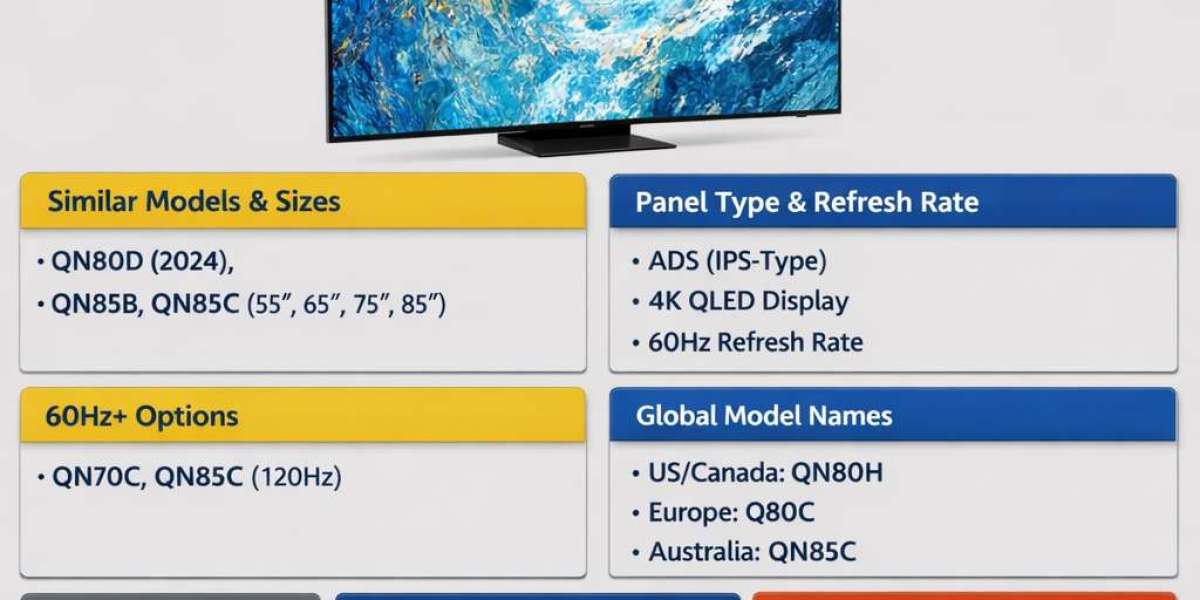
The QN80H family is sold in multiple sizes (availability varies by market). Common sizes include: 55", 65", 75", and 85". Depending on size, Samsung TV lines sometimes use different panel types (e.g., VA vs IPS/ADS) and different native contrast behavior. The QN80 series in various years/regions has historically been associated with ADS/IPS-like panels in some sizes (wider viewing angles but lower native contrast) and VA panels in others (higher native contrast but narrower viewing angles).
What this means in practice: two QN80H TVs of different sizes can look slightly different in a dark room—especially black level uniformity and blooming. If your seating is wide (many side seats), an IPS/ADS-style panel can be a plus; if you watch mostly in a dark room head-on, a VA-type panel is often preferred.
4) Refresh Rate: Which Sizes Are > 60Hz?
For the QN80 family, many sizes are marketed with native 120Hz panels (important for smoother motion and gaming features like 4K@120Hz). However, some regions or specific size variants can be 60Hz. The safest way to confirm is to check the exact model’s spec sheet for: “Motion Rate / Panel Refresh Rate” and whether it supports 4K at 120Hz on HDMI.
If you specifically want >60Hz: look for a QN80/QN85/QN90 model listing explicit 120Hz support and HDMI 2.1 gaming features. In some product lines, Samsung reserves guaranteed 120Hz across all sizes for higher models (e.g., QN85/QN90).
5) Equivalent Model Names in Other Countries
Samsung model naming changes by region. The U.S. SKU QN75QN80HAFXZA typically breaks down as: QN (Neo QLED), 75 (size), QN80 (series), and a region/sales suffix.
In other markets you may see close equivalents like:
- QE75QN80* (common in parts of Europe; “QE” often denotes European QLED TVs)
- QA75QN80* (seen in some Asia-Pacific markets)
- QN75QN80* (North America naming is often “QN”)
The final letters (suffix) vary and can indicate tuner type, region, stand style, or retail channel. When comparing internationally, match the series (QN80), the year/letter, and verify panel refresh rate and ports.
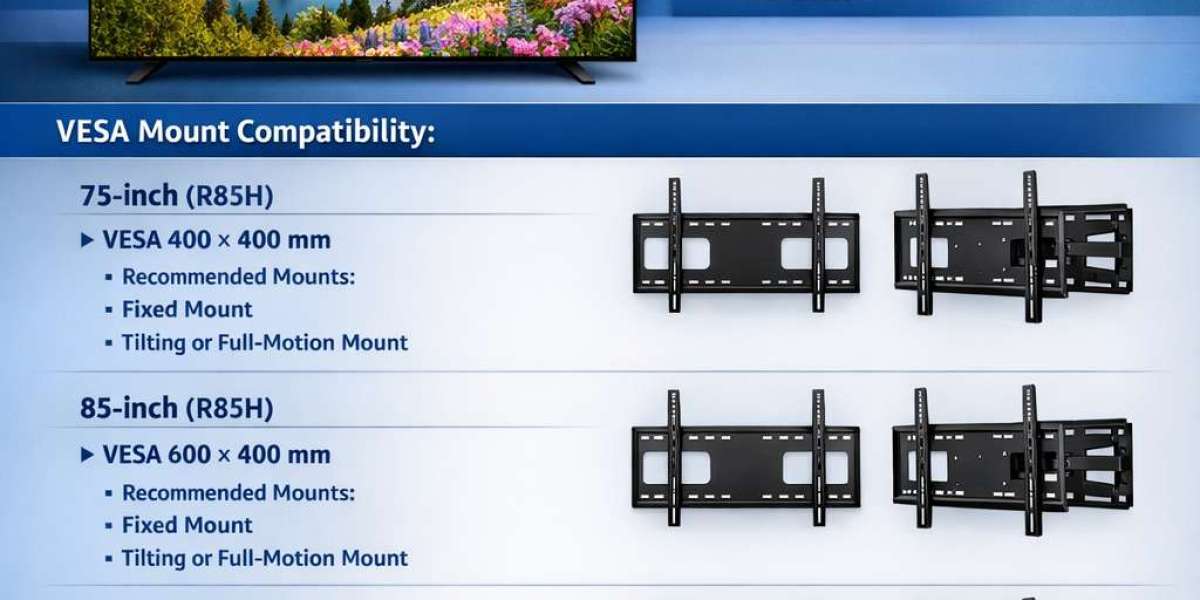
6) VESA Wall Mount Patterns (All Sizes)
VESA patterns can differ by size. Common Samsung patterns for this class are often:
- 55": frequently 200 x 200 mm
- 65": frequently 400 x 300 mm
- 75": often 400 x 400 mm
- 85": often 600 x 400 mm
Important: confirm on the official spec page for your exact model number and size. VESA is usually consistent, but not guaranteed. Also check recommended bolt length and weight rating for your wall mount.
7) Stand / Feet Spacing (Distance Between Feet)
Samsung’s “feet at the edges” designs can require a wide TV bench. The exact distance between feet varies by size and sometimes by production run. For the most accurate measurement, use Samsung’s official “stand dimensions” spec (often listed as: “Set size with stand (W x H x D)”) and any separate listing for “Stand (W x D)” or “foot spacing.”
If the spec page does not provide “distance between feet,” a practical workaround is: measure the stand width in the manual’s dimension diagram, or look for the installation guide PDF for your exact SKU.
8) Common Catches / Complaints in Reviews (What to Watch For)
While many owners like Neo QLED brightness and Samsung’s smart features, recurring criticisms for QN80-class TVs (varies by size/panel) can include:
- Blooming / haloing: Mini-LED local dimming improves contrast, but bright objects on dark backgrounds can show halos, especially with subtitles.
- Black level performance depends on panel type: IPS/ADS-like panels can look more gray in a dark room compared to VA panels.
- Viewing-angle tradeoffs: VA panels may lose contrast off-axis; IPS/ADS panels keep color better off-axis but may sacrifice deep blacks.
- Uniformity issues: some units show DSE (dirty screen effect) in sports/gray scenes or banding—panel lottery can apply.
- Motion / processing preferences: Samsung motion smoothing can create “soap opera effect” if enabled; many users turn it down/off.
- Audio: built-in speakers are often “fine” but not cinematic; many reviewers recommend a soundbar.
9) Buying Tips: Which Model to Choose
- If gaming is a priority: verify 4K@120Hz, VRR, and HDMI 2.1 features on the exact SKU.
- If you watch in a dark room: consider stepping up (QN85/QN90 equivalents) or choose a size known for stronger native contrast.
- If your room is bright: QN80H-class brightness is a strong match; blooming becomes less noticeable with ambient light.
- If wall mounting: confirm VESA pattern and mount weight rating before purchase.