

HDMI eARC vs. HDMI ARC: What’s the Difference?
HDMI ARC and eARC both send television audio to a soundbar or AV receiver through the same HDMI cable used for video. The important difference is capacity: ARC handles stereo and conventional compressed surround sound, while eARC adds enough bandwidth for multichannel PCM and lossless formats such as Dolby TrueHD and DTS-HD Master Audio. This guide explains format support, Dolby Atmos compatibility, cables, setup, and when upgrading matters.
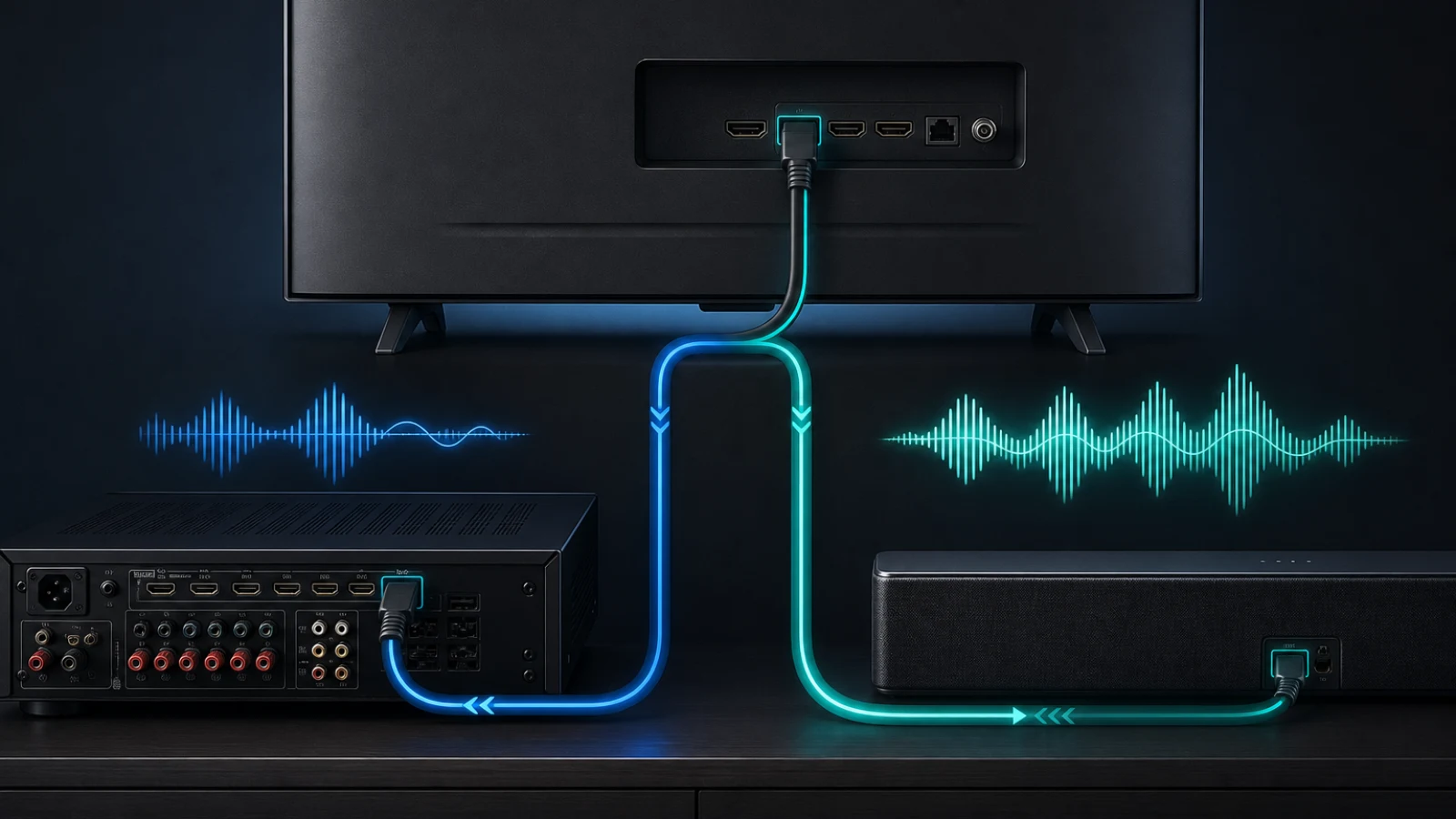
A modern television is often the center of an entire entertainment system. Streaming apps run on the TV, while game consoles, disc players and media streamers connect to its HDMI inputs. The challenge is getting sound from all those sources to a soundbar or AV receiver without adding another audio cable or sacrificing quality.
HDMI ARC and HDMI eARC solve that routing problem. Both create a return path that sends audio out of the television through a designated HDMI port. However, they differ substantially in bandwidth, supported audio formats, device discovery and synchronization.
For basic television and streaming audio, ARC may be entirely adequate. For lossless movie soundtracks, multichannel game audio or a system designed around newer equipment, eARC is the more capable connection.
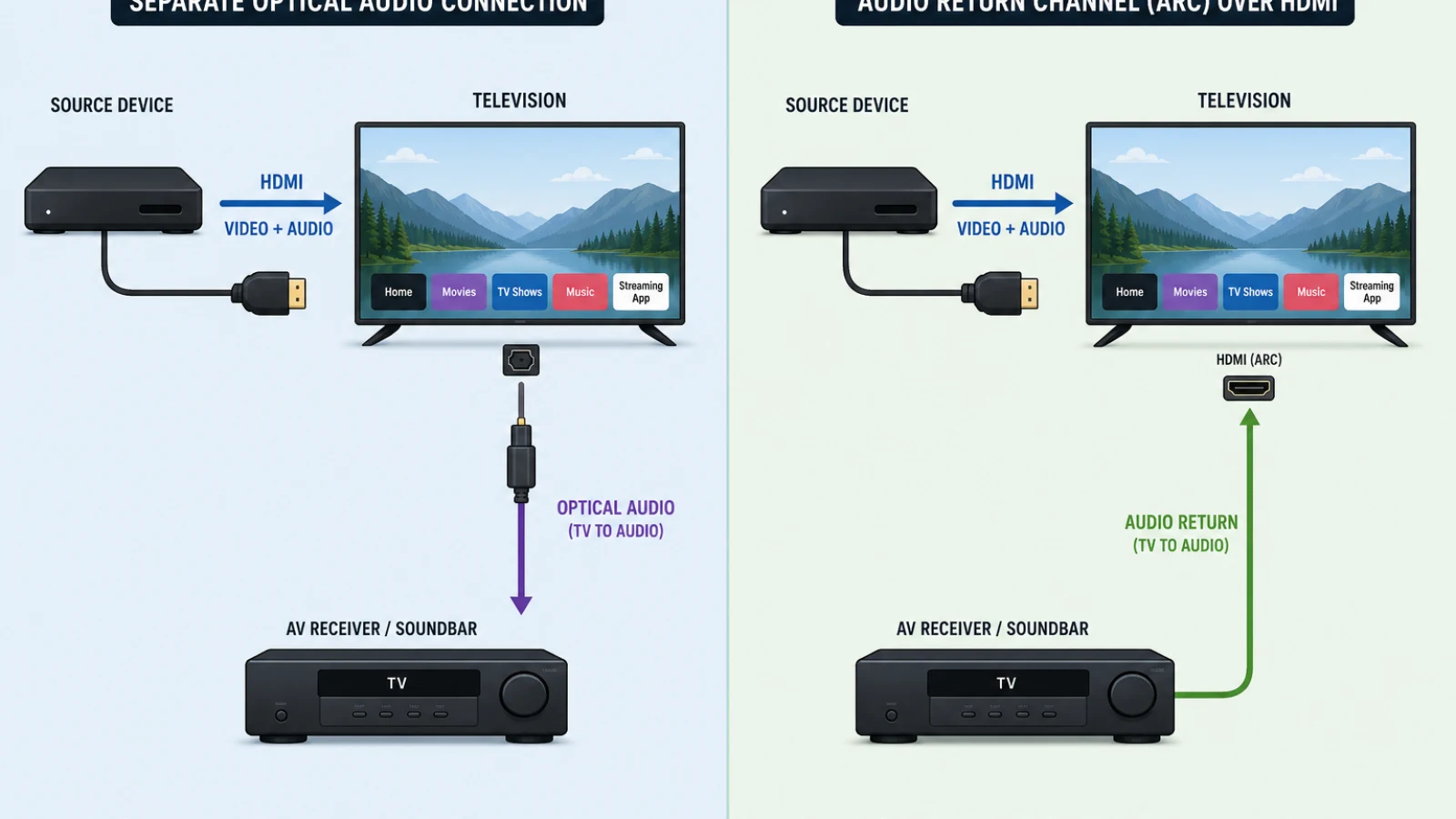
ARC creates an upstream audio path from the TV to a soundbar or receiver, eliminating the separate optical or coaxial audio cable previously required.
Why an Audio Return Channel Is Necessary
A conventional HDMI connection sends video and audio in one direction—from a source device to a display. A Blu-ray player, for example, sends its picture and soundtrack toward the television.
That arrangement became less convenient as televisions gained digital tuners and streaming apps. Audio originating inside the TV needed to travel in the opposite direction to an external sound system. Before ARC, this commonly required a separate optical or coaxial S/PDIF cable.
The HDMI 1.4 specification, made available to manufacturers in June 2009, introduced Audio Return Channel. As the original HDMI announcement explained, ARC allowed a television to send audio “upstream” to an AV receiver through the existing HDMI connection.
That change mattered because one cable could perform two jobs: carry video from an AV receiver or soundbar to the TV and return TV audio to the sound system. It also supported conveniences such as controlling compatible audio equipment with the television remote.
What HDMI ARC Can Carry
ARC was designed around the audio requirements common to television broadcasts, DVDs and early streaming services. Its maximum audio bandwidth is approximately 1 megabit per second, according to the HDMI Forum’s ARC and eARC comparison.
ARC normally supports:
- Two-channel uncompressed PCM
- Dolby Digital 5.1
- DTS Digital Surround, when both products support DTS
- Other compressed formats implemented by the TV and audio device
The original HDMI 1.4 feature documentation compared ARC’s audio capabilities with those of an S/PDIF connection. Consequently, ARC does not have enough capacity for uncompressed 5.1 or 7.1 PCM, Dolby TrueHD or DTS-HD Master Audio.
Implementation also varies among products. Some televisions can send Dolby Digital Plus through ARC, including Dolby Atmos encoded within a Dolby Digital Plus stream. Others convert incoming audio to regular Dolby Digital or stereo PCM.
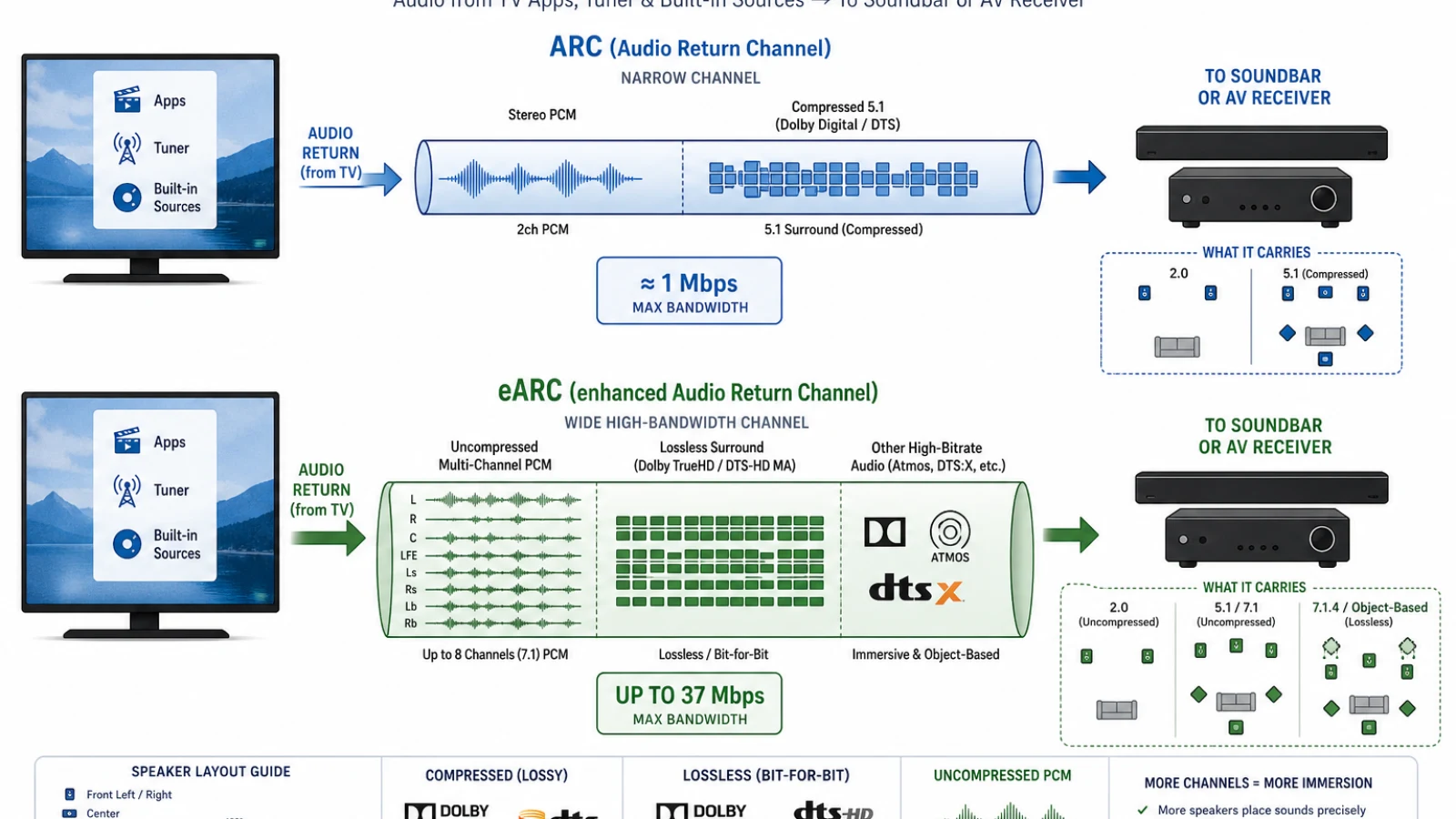
eARC raises return-channel capacity from about 1 Mbps to as much as 37 Mbps, enabling multichannel PCM and lossless formats that ARC cannot transport.
What eARC Changes
Enhanced Audio Return Channel was introduced with the HDMI 2.1 specification, released on November 28, 2017. The HDMI Forum described eARC as a way to improve connectivity while supporting more advanced audio formats and higher audio quality.
The central improvement is bandwidth. eARC provides up to 37 megabits per second for audio, compared with approximately 1 megabit per second for ARC. That additional capacity supports uncompressed multichannel signals and high-bitrate lossless codecs.
The current HDMI Licensing Administrator overview lists support for audio up to 192 kHz and 24-bit, including uncompressed 5.1 and 7.1, Dolby TrueHD, DTS-HD Master Audio, Dolby Atmos and DTS:X. The specification can accommodate as many as 32 uncompressed channels, although consumer sound systems typically use far fewer.
ARC and eARC format comparison
| Audio signal | ARC | eARC |
|---|---|---|
| Stereo PCM | Yes | Yes |
| Dolby Digital 5.1 | Yes | Yes |
| Core DTS 5.1 | Usually, if supported by both devices | Yes, if supported by both devices |
| Dolby Digital Plus | Device-dependent | Yes, if implemented |
| Dolby Atmos in Dolby Digital Plus | Possible and device-dependent | Yes, if implemented |
| Multichannel PCM | No | Yes |
| Dolby TrueHD | No | Yes |
| Dolby Atmos in Dolby TrueHD | No | Yes |
| DTS-HD Master Audio | No | Yes |
| DTS:X carried in DTS-HD | No | Yes |
The table describes what the connections can transport, not what every television will pass through. A manufacturer can omit support for a particular codec even when the HDMI connection has sufficient bandwidth. Always check the TV and sound system specifications for both eARC and the desired audio format.
Dolby Atmos Does Not Automatically Require eARC
The relationship between Dolby Atmos and ARC is frequently misunderstood because Atmos is not a single transmission codec. It is an immersive-audio system whose audio and spatial metadata can be packaged in different formats.
Streaming services commonly deliver Atmos in compressed Dolby Digital Plus. Dolby’s technical documentation confirms that Dolby Digital Plus with Atmos can be passed through ARC, provided the TV and receiving equipment support it.
Blu-ray and Ultra HD Blu-ray discs can carry Atmos within lossless Dolby TrueHD. Dolby states that TrueHD can reach 18 Mbps on Blu-ray, far beyond ARC’s available bandwidth. Passing that version of Atmos from a TV to a receiver or soundbar requires eARC.
The practical distinction is therefore:
- ARC may carry streaming-quality Atmos encoded in Dolby Digital Plus.
- eARC is needed for lossless TrueHD-based Atmos when the signal must return through the TV.
A soundbar displaying “Dolby Atmos” does not by itself reveal which carrier format is in use. Its information screen or mobile app may identify Dolby Digital Plus or Dolby TrueHD.
Why eARC Matters for Games
Game consoles and PCs frequently produce audio as uncompressed multichannel PCM rather than as a pre-encoded movie soundtrack. ARC cannot return 5.1 or 7.1 PCM, so a television may reduce the signal to stereo or re-encode it into a compressed format.
eARC can return multichannel PCM without that conversion. This is particularly useful when a console is connected directly to a TV to retain video features such as 4K at 120 Hz, variable refresh rate or low-latency gaming, while audio is sent back to an older AV receiver or a soundbar.
The audio device must still support eARC and the channel layout being sent. Selecting “pass-through,” “bitstream” or an equivalent digital-audio setting on the TV may also be necessary.
eARC Improves Discovery and Lip-Sync Handling
ARC relies on HDMI Consumer Electronics Control, or CEC, for device discovery and communication. CEC also enables functions such as power synchronization and volume control, but implementations from different manufacturers have not always behaved consistently.
eARC adds a dedicated bidirectional data channel for discovering an audio device and exchanging capability information. The HDMI Forum’s technical comparison identifies automatic lip-sync correction as optional for ARC but mandatory in the eARC specification. Volume and power commands can still use CEC.
These changes are intended to make setup more predictable, but they cannot eliminate every real-world problem. Firmware, television processing, app behavior and the audio system can still introduce delays or handshake failures. eARC provides a better-defined foundation rather than a guarantee that products from every manufacturer will work flawlessly together.
Do You Need a New HDMI Cable?
ARC works through existing HDMI cable categories when both connected ports support ARC. For eARC, the cable guidance is more specific.
A High Speed HDMI Cable with Ethernet will work in many eARC systems and is recommended in Sony’s eARC guidance. However, HDMI Licensing’s current guidance says older Standard or High Speed cables with Ethernet may operate with eARC but are not certified specifically for it.
For the least ambiguity—particularly with a new 4K or 8K installation—use a certified Ultra High Speed HDMI Cable. There is no official cable category called an “HDMI 2.1 cable.” HDMI Licensing rules associate cables with category names and certification labels rather than HDMI version numbers.
An expensive cable does not improve sound quality when a valid digital signal is already arriving intact. Replace a cable if eARC disconnects, produces dropouts or fails to negotiate the intended format, not because premium materials are claimed to make digital audio sound richer.
Both Devices Must Support the Connection
Connect the television’s HDMI port labeled ARC or eARC/ARC to the audio system’s corresponding HDMI output. On most TVs, only one HDMI socket provides the return channel.
An eARC television connected to an ARC-only soundbar normally operates within ARC’s limitations. Sony explicitly notes that such a combination is restricted to ARC-level audio. However, HDMI Licensing cautions that eARC itself is not formally defined as backward-compatible with ARC. Manufacturers commonly include ARC fallback, but compatibility should still be verified for the particular products.
This distinction reconciles two apparently conflicting claims: the broader HDMI specifications are backward-compatible, while individual optional features do not guarantee that every mixed-generation pairing will support every mode.
Common Setup Problems
If ARC or eARC produces no sound, check the following before replacing equipment:
- Confirm that the cable uses the labeled return-channel port on both devices.
- Enable ARC or eARC in the television’s audio settings.
- Turn on HDMI-CEC if the product requires it for ARC operation or remote control.
- Choose the external audio system instead of the TV speakers.
- Set digital audio output to pass-through, auto or bitstream when appropriate.
- Confirm that the source, TV and sound system all support the desired codec.
- Install current firmware for the television and audio device.
- Power-cycle all connected components to force a new HDMI handshake.
If lossless audio still fails, connect the source directly to an HDMI input on the receiver or soundbar. This bypasses the television’s audio pass-through limitations, although the audio device must also support the required video format.
Is eARC Worth Upgrading For?
eARC is most valuable for systems using Ultra HD Blu-ray players, current game consoles, gaming PCs or local media files with Dolby TrueHD, DTS-HD Master Audio or multichannel PCM. It also simplifies connecting high-performance video sources directly to a TV while preserving full-quality audio.
ARC remains sufficient for stereo television sound, Dolby Digital 5.1 and many streaming setups. Moving from ARC to eARC will not improve a soundtrack that is already being delivered in the same compressed format. Its benefit is the ability to transport signals ARC cannot carry, not automatic enhancement of every audio source.
Conclusion
HDMI ARC eliminated the need for a separate cable between a television and an external sound system. HDMI eARC preserves that convenience while adding far more bandwidth, multichannel PCM, lossless audio formats, better device discovery and mandatory lip-sync support.
Choose based on the source formats and equipment in the system. ARC is adequate for conventional and many streaming soundtracks; eARC is the better choice for lossless movie audio, modern gaming and the widest practical compatibility with advanced surround formats.
Resource credits
- HDMI Licensing, LLC Releases HDMI Specification Version 1.4 — HDMI Licensing Administrator
- HDMI 1.4 Feature Descriptions Archive — HDMI Licensing Administrator
- HDMI Forum Releases Version 2.1 of the HDMI Specification — HDMI Forum
- HDMI 2.1 November Release Presentation — HDMI Forum
- Enhanced Audio Return Channel — HDMI Licensing Administrator
- HDMI 2.2 Specification Overview — HDMI Licensing Administrator
- What Is the Enhanced Audio Return Channel Feature? — Sony Electronics Support
- Dolby Atmos: Dolby Digital Plus Online Delivery Documentation — Dolby Laboratories
- Dolby TrueHD Lossless Audio — Dolby Professional
Join the discussion
Share your thoughts or questions with the Tech Steve community.
Log in to discuss